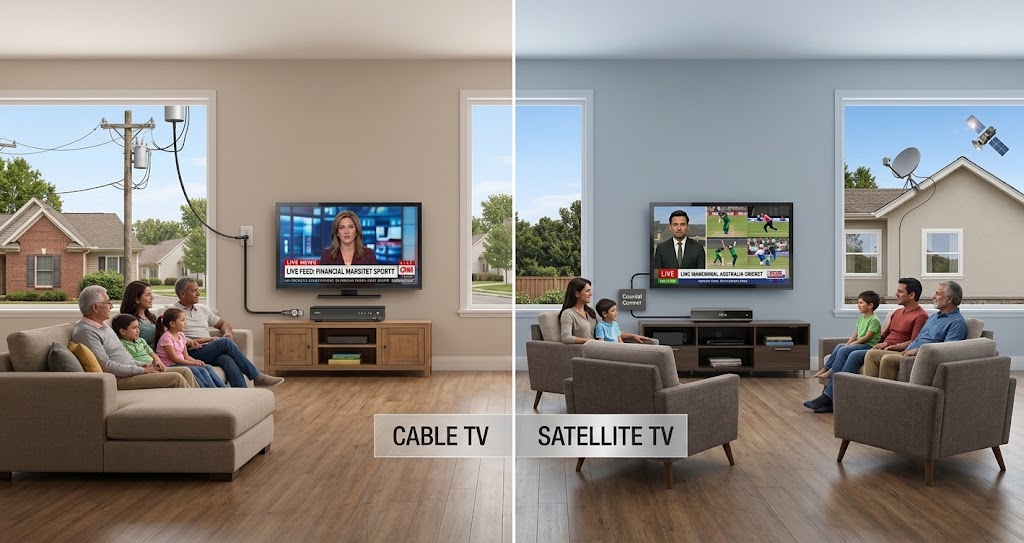
Watching television has changed dramatically over the past few years. Viewers no longer want to flip endlessly between channels just to keep up with breaking news, live sports, financial updates, or multiple events happening simultaneously. That’s exactly where DIRECTV Multiview Mix channels come in. Nearly two-thirds of U.S. viewers are expected to use a second screen while watching TV in 2026.
Whether you are a sports enthusiast trying to follow several games at once or a news watcher monitoring multiple live broadcasts, DIRECTV Mix Channels simplify the experience by bringing multiple streams together on a single screen.
In this complete guide, we’ll explain everything you need to know about DIRECTV Multiview Mix channels, including how they work, how to navigate them, how to switch channels, and how DIRECTV streaming users can benefit from them from reliable service providers. We’ll also answer the most common questions users search online regarding sports mix and news mix functionality.
What Are DIRECTV Multiview Mix Channels?
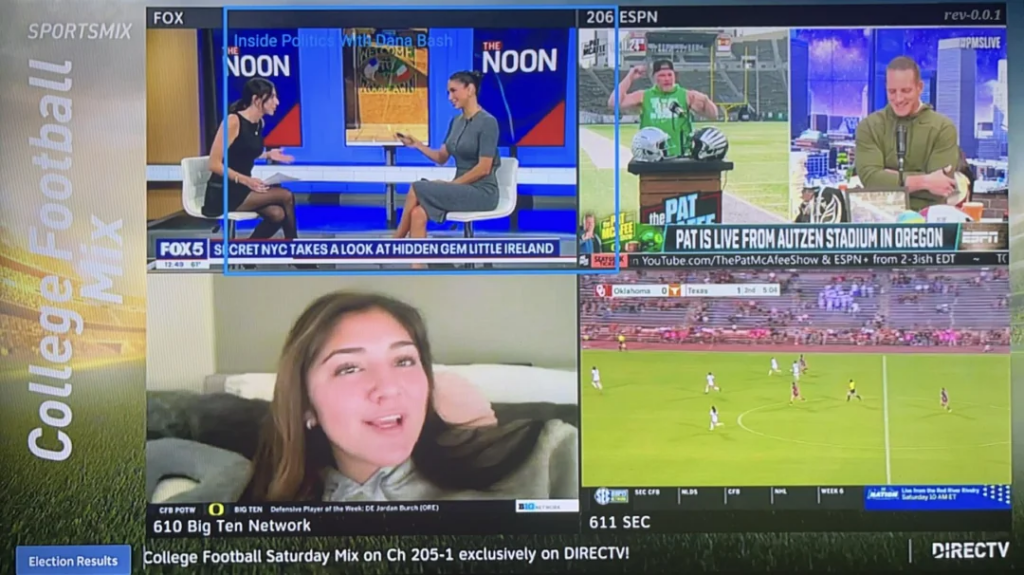
DIRECTV Multiview Mix channels are interactive channels that allow viewers to watch multiple live broadcasts simultaneously on one screen. Instead of switching back and forth between channels, viewers can monitor several streams at the same time.
These channels are especially popular for:
- Live sports coverage
- Breaking news events
- Financial market updates
- Major tournaments
- Election coverage
- Multi-game viewing experiences
The feature is designed to improve convenience and create a more immersive viewing experience for households, hotels, sports bars, hospitality venues, and entertainment-focused businesses.
Today, many viewers search for terms like directv mix channels, mix channels on directv, and directv new mix channels because these interactive viewing options continue to evolve with modern streaming habits.
How DIRECTV Mix Channels Work
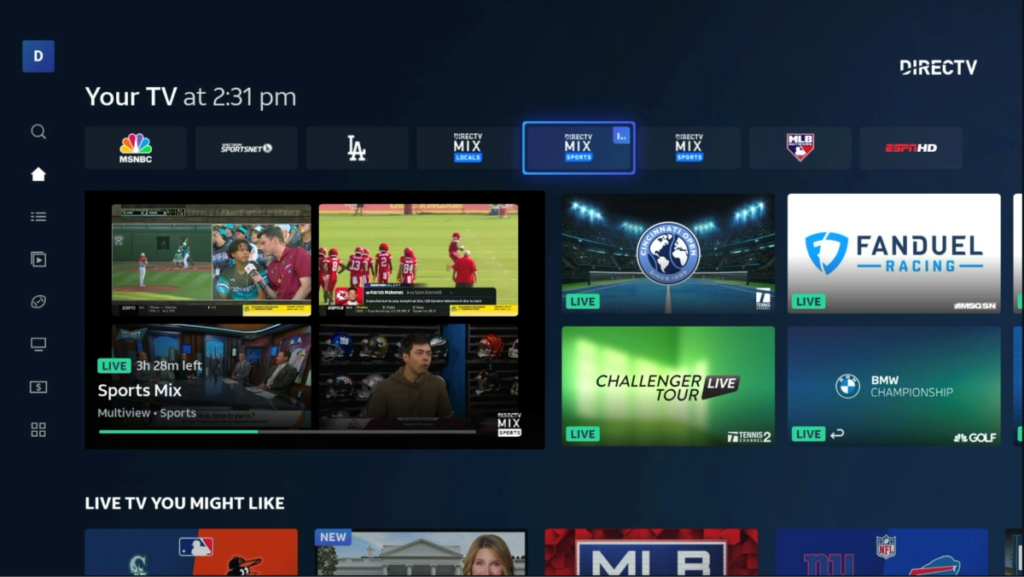
DIRECTV combines multiple live feeds into a single viewing layout. Each feed represents a different live channel or event, allowing viewers to see several broadcasts simultaneously. For example:
- A sports mix screen may display ESPN, ESPN+, etc., four live games at once.
- A news mix screen may show CNN, FOX News, MSNBC, and Bloomberg together.
- A tournament mix may display different matches from the same sporting event.
Many users searching how to use directv mix channels are often surprised to learn that the feature is intentionally simple and designed for quick navigation. The interface typically includes:
- Multiple mini live screens
- Highlighted active channel
- Audio selection options
- Remote-based navigation
- Quick switching between feeds
This setup creates a seamless viewing experience for users who want real-time updates without channel surfing.
DIRECTV Sports Mix Channels Explained
One of the most popular features is the sports mix functionality. Sports fans frequently search terms such as:
- DIRECTV sports mix change channels
- How to change channels on directv sports mix 205
- Can you change channels directv sports mix
DIRECTV Sports Mix channels are specifically designed for live sporting events where multiple games occur simultaneously.
What Is Sports Mix Channel 205?
Channel 205 is widely recognized as DIRECTV’s Sports Mix channel. It displays several live sporting events at once, making it ideal during:
- NFL Sundays
- NCAA tournaments
- NBA game nights
- MLB coverage
- International sporting events
Instead of opening separate channels individually, viewers can monitor every important moment from one centralized screen.
How to Change Channels on DIRECTV Sports Mix 205
Many users ask: how to change channels on directv sports mix 205? The process is straightforward:
- Open Sports Mix on Channel 205.
- Use your DIRECTV remote arrow buttons.
- Highlight the game or event you want to focus on.
- Press “Select” on the remote.
- The system switches to the full-screen broadcast of that selected game.
This is why users often search phrases like can you change channels directv sports mix or directv sports mix change channels. The feature allows users to quickly jump from one event to another without manually entering channel numbers.
DIRECTV News Mix Channels: Staying Updated in Real Time
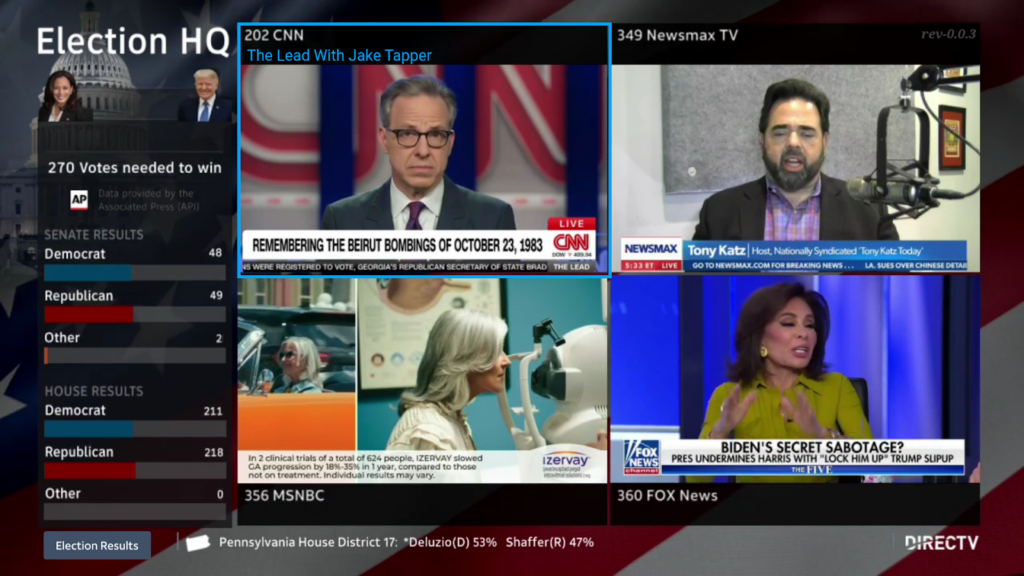
Another highly popular feature is the DIRECTV news mix channels experience. News Mix channels allow viewers to monitor several news networks simultaneously. This feature becomes especially useful during:
- Elections
- Global breaking news
- Financial market volatility
- Weather emergencies
- International conflicts
- Major political events
Instead of relying on a single perspective, viewers can compare multiple networks in real time.
How to Change Channels on DIRECTV News Mix
A common search query is:
- How to change channels on directv news mix
- How to change news mix channels on directv
- DIRECTV news mix change channels
The navigation process is very similar to Sports Mix:
- Open the News Mix channel.
- Use your remote arrows to highlight the desired news feed.
- Press “Select.”
- The chosen channel opens in full-screen mode.
This allows viewers to instantly switch focus between news networks without manually browsing channels.
DIRECTV Stream Mix Channels: Streaming Experience Explained
Streaming has become a major part of modern television consumption, which is why many users now search:
- DIRECTV stream mix channels
- DIRECTV mix channels streaming
DIRECTV has adapted its mix channel functionality for streaming audiences as well. DIRECTV STREAM users can access multiview experiences depending on compatible devices and available programming packages.
Benefits of DIRECTV Stream Mix Channels
Streaming-based mix channels offer several advantages:
1. Multi-Event Monitoring
Users can keep track of several live events simultaneously.
2. Better Sports Experience
Sports fans never miss key moments from different games.
3. Improved User Convenience
The need for constant channel switching is reduced.
4. Real-Time News Tracking
Breaking news can be monitored from multiple sources simultaneously.
5. Enhanced Hospitality Entertainment
Hotels and hospitality venues can provide premium entertainment experiences to guests using advanced DIRECTV viewing setups. This is one reason hospitality providers like CSS increasingly integrate DIRECTV entertainment systems into modern guest experiences.
Why DIRECTV Multiview Mix Channels Matter Today
The popularity of DIRECTV Multiview Mix channels continues to grow because modern viewers consume content differently than before. People now expect:
- Faster access to information
- Multi-screen experiences
- Interactive navigation
- Real-time updates
- Simultaneous viewing flexibility
DIRECTV Mix technology aligns with changing viewing habits by offering faster access to live news, sports, and entertainment. Senior care providers can also explore customized DIRECTV solutions for senior living communities designed around residents’ viewing preferences and facility needs.
Guests appreciate having access to premium viewing experiences during major sports events and breaking news coverage.
Tips for Using DIRECTV Mix Channels More Efficiently
If you are new to DIRECTV Mix functionality, these tips can improve your viewing experience.
1. Use HD-Compatible Equipment
Modern HD or 4K-compatible receivers provide a smoother multiview experience.
2. Learn Remote Navigation Shortcuts
Understanding how to quickly switch focus between feeds makes navigation easier.
3. Use Sports Mix During Major Events
Large sporting weekends are when Sports Mix becomes most valuable.
4. Monitor Multiple News Sources
News Mix channels help viewers compare coverage and gain broader perspectives.
5. Optimize Internet for Streaming
For users accessing directv mix channels streaming, stable internet speeds improve overall performance.
DIRECTV Mix Channels for Hospitality & Commercial Use
DIRECTV multiview technology is especially valuable in commercial environments. Hotels, resorts, sports bars, casinos, and entertainment venues often use DIRECTV systems to create engaging guest experiences.
Benefits include:
- Enhanced guest satisfaction
- Better sports viewing environments
- Simultaneous entertainment options
- Professional-grade viewing setups
- Reduced channel navigation confusion
Hospitality businesses that invest in advanced entertainment solutions often see stronger guest engagement and improved customer experiences.
Common Issues Users Face With DIRECTV Mix Channels
Although the system is user-friendly, some viewers occasionally encounter issues.
1. Remote Navigation Not Working
Ensure your receiver is updated and the remote is paired correctly.
2. Mix Channel Missing
Some Mix channels only appear during live events or specific programming schedules.
3. Streaming Delays
DIRECTV STREAM users may experience delays if internet connectivity is unstable.
4. Audio Confusion
Remember that only one feed provides active audio at a time unless your device supports advanced multiview audio customization.
The Future of DIRECTV Multiview Technology
As streaming and interactive television continue evolving, multiview experiences are expected to become even more advanced. Future improvements may include:
- Personalized multiview layouts
- AI-powered content recommendations
- More customizable feed selection
- Expanded sports integrations
- Interactive streaming controls
- Voice-controlled navigation
DIRECTV continues adapting to changing entertainment trends, making multiview technology increasingly relevant for modern audiences.
Final Thoughts
DIRECTV Multiview Mix channels have transformed how viewers experience live television. Instead of constantly changing channels, users can monitor sports, news, and major events from one convenient interface.
Whether you are exploring directv mix channels streaming, learning how to change channels on directv news mix, or trying to maximize the Sports Mix experience, these features provide a smarter and more engaging way to watch television.
For both residential viewers and hospitality businesses, DIRECTV Mix technology delivers a more modern, interactive, and efficient entertainment experience that aligns perfectly with today’s viewing habits.
FAQs About DIRECTV Multiview Mix Channels
1. What are DIRECTV Multiview Mix channels?
DIRECTV Multiview Mix channels allow users to watch multiple live broadcasts simultaneously on a single screen.
2. How do you change channels on DIRECTV Sports Mix 205?
Use the arrow buttons on your remote, highlight the desired game, and press Select to switch to full-screen viewing.
3. Can you change channels on DIRECTV Sports Mix?
Yes. Users can navigate between available live games directly through the Sports Mix interface.
4. What are DIRECTV News Mix channels?
DIRECTV News Mix channels combine multiple live news broadcasts into one screen for real-time monitoring.
5. Does DIRECTV STREAM support Mix channels?
Yes. Certain DIRECTV STREAM packages and devices support multiview and mix channel functionality.